What's New in Plantory - February 2026
Plant identification, journal timeline, achievement badges, hardscape planning, social sharing, and much more.
February has been a packed month for Plantory. We have shipped a wave of features designed to help you understand your garden better, plan beyond plants, and share your progress with others. Here is everything that is new.
Track Your Garden's Story Over Time
A new journal timeline lets you scroll through every planting, watering, and harvesting event in chronological order. It is a beautiful way to look back on your garden's journey -- and to remember what worked last season.
Earn Achievements as You Grow
Gardening milestones now come with rewards. Plant your first seedling, harvest your first tomato, or fill your first zone -- each milestone unlocks a badge on your garden profile. It is a fun way to track your progress and celebrate the small victories.
Plan Paths, Raised Beds, and More
Plants are just one part of a garden. A new structure planning tool lets you place paths, raised beds, fences, pergolas, and water features directly on your canvas. Everything snaps to the grid and can be rotated or resized, so your full garden layout lives in one place.
Identify Any Plant from a Photo
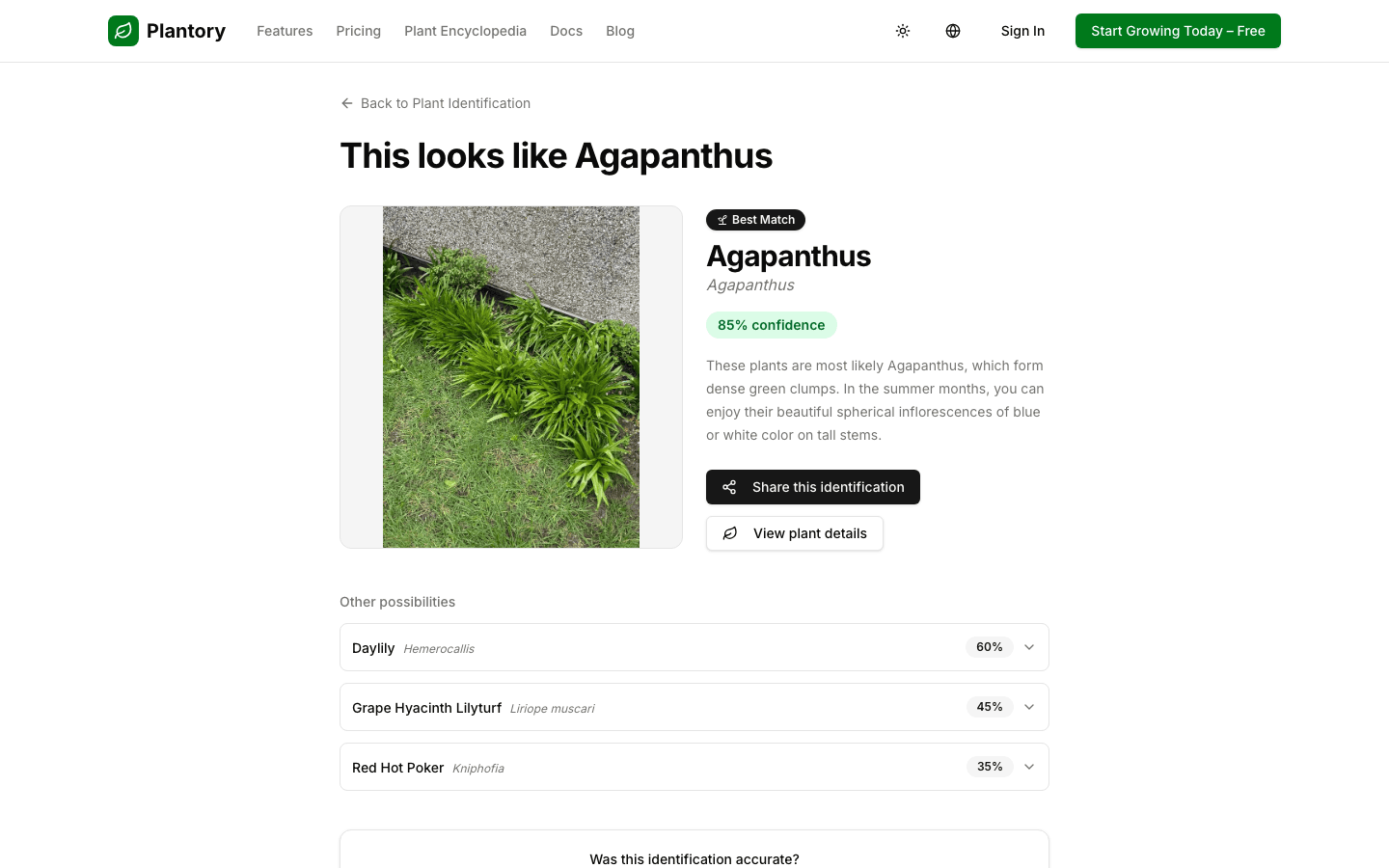
Not sure what is growing in your garden? Upload a photo and Plantory will suggest species with confidence scores. It is the fastest way to put a name to that mystery plant in the corner of your yard.
Describe the Garden You Want
When generating a visualization of your garden, you can now type your own instructions -- like "make it look more cottage-style" or "add more color." The result is a visualization that actually matches your vision.
See a Polished Top-Down View
A new visualization mode turns your 2D plan into a beautifully rendered overview. It is the perfect way to see your layout come to life before you start digging.
More to Explore
- Public plant gallery -- Browse our growing library of plant species with photos and care info, no account needed.
- Seasonal gardening tips -- Receive timely reminders based on your climate and what you have planted.
- Plant detail pages -- Every plant now has its own page with soil types, bloom calendar, and care instructions.
- Shopping list shortcut -- A direct link on the Plants page takes you straight to your shopping list.
- Intelligence Hub -- All smart features gathered in one panel inside your garden.
- Satellite preview -- See aerial imagery when setting up your garden location.
- More AI suggestions -- Higher recommendation limits across every plan tier.
- Smarter plant quantities -- AI now considers zone size so large areas get more suggestions and small spaces stay balanced.
- Email preferences -- Control which notifications you receive, with one-click unsubscribe in every email.
Bug Fixes and Polish
We squashed a bunch of bugs too. The billing page no longer spins forever when something goes wrong -- you will see a clear error with a retry button. Demo gardens now display all zones correctly. Drawing zones while zoomed in is much more precise (and you can zoom up to 2000% now). Dark mode looks better than ever, loading spinners are consistent everywhere, and error messages are friendlier across the board.
Try It Out
Spring is coming -- open Plantory, try plant identification on that mystery plant, and start planning your garden before planting season begins.
All Changes
New
- Track your garden's story over time – a new journal timeline lets you scroll through planting, watering, and harvesting events in chronological order.
- Earn achievements as your garden grows – reach milestones like your first plant or first harvest to unlock achievement badges on your garden profile.
- Share your garden with the world – new sharing buttons for Facebook, Twitter, and Pinterest, plus an embed code so you can show off your garden on any website.
- Plan paths, raised beds, and other structures – a new planning tool lets you place and arrange non-plant elements like fences, pergolas, and water features on your canvas.
- Identify plants from a photo – upload a photo and get species suggestions with confidence scores to help you figure out what's growing.
- Describe how you want your garden to look – when regenerating your garden visualization, you can now type custom instructions like "make it more cottage-style."
- See a polished top-down view of your garden – a new visualization mode turns your 2D plan into a beautiful rendered overview.
- Explore every plant in detail – each plant in your garden now has its own detail page with soil types, bloom calendar, and care instructions.
- Browse the public plant gallery – explore our growing library of plant species with photos and care info, no account needed.
- Get seasonal gardening tips automatically – receive timely reminders and content tailored to your climate zone and what you've planted.
- Agree to our terms before signing up – registration now clearly shows our Terms of Service and Privacy Policy for your peace of mind.
- Jump to your shopping list faster – a direct link on the Plants page takes you straight to your shopping list.
- Find all smart features in one place – a new Intelligence Hub in your garden gathers recommendations and journal in a single panel.
- Preview your garden location from above – satellite imagery is now available when setting up your garden's location.
Improved
- Get more AI recommendations on every plan – we've increased the number of AI-powered suggestions across all plan tiers.
- Smarter plant quantity suggestions – AI recommendations now consider your zone size, so larger areas get more suggestions and small spaces don't get overcrowded.
- Manage your email preferences easily – choose which notifications you want to receive directly from your account settings, with one-click unsubscribe in every email.
- Clearer sidebar label – the plants sidebar now says "Plants in garden" so you always know you're looking at plants in this specific garden.
- Automatic subtitles on videos – if your language isn't English, the homepage video now shows subtitles automatically.
- Better buttons everywhere – all buttons now show a hand cursor when you hover, so it's always clear what you can click.
- Smoother loading experience – loading spinners are now consistent across every page, so you always know something is happening.
- Better dark mode support – badges, dialogs, and calendars now look great in dark mode.
- Improved accessibility – screen readers now properly announce canvas controls, team invitation buttons, and icon-only elements.
- Friendlier error messages – when something goes wrong, you'll see a clear message instead of the app silently failing.
- More precise zone drawing when zoomed in – drawing zones at high zoom levels is now much more accurate, and you can zoom in up to 2000%.
Fixed
- Billing page no longer gets stuck loading – if your subscription info can't be found, you'll see a clear error with a retry button instead of a never-ending spinner.
- Demo gardens now show all zones – the demo page correctly displays all zones and plants instead of appearing empty.
- No more flickering on the settings page – fixed an issue that could cause brief visual glitches when navigating away from settings.
- Task creation now shows errors – if something goes wrong when creating a task, you'll see a helpful error message instead of nothing happening.
- Team invitations require a valid email – the invite form now checks your email before sending and shows a clear message if something's wrong.
- "Continue" button explains itself – when the Continue button is disabled during map setup, you'll now see a message explaining what's needed.
- Canvas stays still when panning – holding the spacebar to pan no longer accidentally triggers drawing or editing tools.
- New users receive emails in their language – your language preference is now correctly passed along during registration so emails arrive in the right language.